
How to Automate Copilot Studio Credit Limits for Agents
copilot-studio-credit-limit-power-automate
copilot-studio-credit-limit-power-automate

Introduction It is a common scenario to have an auto increment column for automation projects like generating unique id for projects, invoices, purchase order etc. In most cases, the requirement is to have an increment value based on fiscal year. The out of the box auto number data type in Dataverse does not give flexibility […]
The introduction of adding images or documents (in preview) as input parameter in custom GPT prompt makes it easier for non technical users to extract specific fields without the need for pre-training models with sample data. This reduces the time and effort spent on preparing and fine-tuning custom models for document processing. Features & Benefits: […]
Use Case The “Requeue item with delay” pattern delays the execution of work queue item but does not define the max attempts for its processing. In the below example, I have demonstrated the technique to stop reprocess work items after certain attempts. To achieve that, we can use ‘requeuecount‘ property as max retry count and […]

Full video tutorial is available on my YouTube channel: Use Case In UI automation, it is a standard process to sign in to an application (desktop or web) to process data in power automate desktop flow. Azure Key Vault is the safest place to securely store the application password. Storing password in Vault also allows […]

Use Case Automation KIT is a set of tools that accelerate the use & support of Power Automate for desktop for automation projects. One of its limitations is that it does not provide the number of transactions processed by a Power Automate Desktop flow. Prerequisites Each desktop flow should return the count of transactions in […]

With the introduction of Dataverse Cloud Connector (preview) in power automate desktop flow (in Version 2.44), it becomes easier to add intelligence in PAD using Dataverse AI functions. This will address the issue of setting up HTTP request trigger or any other approach for calling AI functions from Power Automate Desktop. You can find official […]
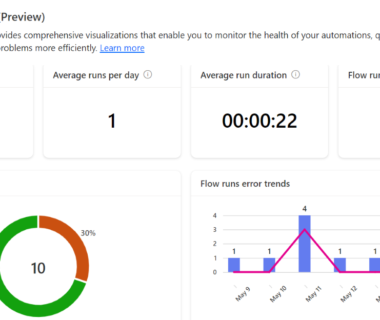
Use Case Microsoft introduced a new preview feature “Automation Center” to efficiently monitor the health of cloud and desktop flows. This report can help in detecting issues and troubleshoot problems quickly. When navigated to dashboard, I found details for some flow runs were missing in the dashboard & reports. In this article, I have demonstrated […]

Recently, I came across Dataverse AI functions that have been newly introduced by Microsoft. The documentation for leveraging these functions from canvas app is very well explained in the below mentioned link: AISummarize, AISentiment, AIReply, AITranslate, AIClassify, and AIExtract functions – Power Platform | Microsoft Learn I could not find the documentation for calling those […]
Use Case Recently, I came across a problem of filtering the records by choice text (label text) from Dataverse table. This is a common query posted by users in Power Platform community. So, I decided to write this blog and explain the ways to address this problem. Please note that below solution will work only […]
